I know you’ll ask AI to summarise this. I’ve prepared the short version:
- The invitation gives us a working environment; then we need to learn to use it. Check the workspace, enabled tools, models and team rules. Start with a small test.
- Choose the model for the task. Routine preparation and difficult problem analysis may need different resources. Increase reasoning when the result justifies it.
- Optimise the whole job. A clear prompt and a useful check consume resources but can save many restarts. Tokens, included allowances, credits and AWS costs are different measures.
- Give agents a bounded assignment. In our example, we add an Apache site to two existing EC2 instances, with a certificate for the domain and
www, load balancing and HTTP-to-HTTPS redirects. - Follow execution through verifiable status. The progress task reads phases, heartbeats and evidence; it reports blockers and errors and announces completion only after testing.
- Using AI is part of the working method. Explain how the deliverable was prepared and checked. Expertise also helps us decide what to delegate and recognise errors.
We use ChatGPT Business as the reference here. Check which tools and models are actually available in your workspace. The AWS case is an operational example: the domain, account and resources must be those authorised in your environment. These configurations have not been applied to a client’s infrastructure.
Before starting, understand what you have joined
The invitation arrives, we accept it and a new space appears. It is tempting to try everything immediately, or wait for someone to tell us exactly what to do.
Take a first tour with a simple objective: understand where we are working and what we can use. Sign in with the address that received the invitation and check the active workspace. The AI Business account and the AWS account in our example are separate environments: an invitation to the first does not grant access to the second. Joining ChatGPT Business.
If we already have a personal space, distinguish switching workspaces from migrating content. Moving personal content into Business is a separate choice with consequences for access and data management; consider it before confirming. Personal workspace migration.
Ask the team’s contact which tools are enabled, which data may be used and where deliverables belong. A shared project does not automatically make every chat shared. Before attaching documents, check the audience and settings for the specific material. Sharing in Business.
Learn the tools through a small deliverable
A good first exercise is to turn an already sanitised internal procedure into a one-page checklist. We know the source and can check the output. Test attachments, search, file creation and saving in the project one feature at a time.
In Chat, we can clarify the assignment and reason about materials. Work is designed to carry out activities using available tools. Codex is useful when the work involves code, configuration and a project folder. These are starting points: verify capabilities and access in the actual session. ChatGPT Work and Codex.
<assignment type="first-business-test">
  <objective>Turn the attached test procedure into a checklist.</objective>
  <material>A minimised copy without credentials or personal data.</material>
  <deliverable>One page with activities, outcome checks and source passages.</deliverable>
  <method>
    Check which features are available in this session.
    Use only the attached document; flag ambiguous steps.
    If you can produce a file, deliver it in a format I can open.
    If a feature is missing, explain the manual handover needed.
  </method>
  <reuse>Identify instructions worth saving in the project.</reuse>
</assignment>
Open the file and compare it with the procedure. We have learned something more concrete than the names of ten features: how to take a request through to a deliverable.
The available models are not all the same tool
Check the actual selector. As of 25 November 2026, the Business documentation lists GPT-6.2 Sol and GPT-6.2 Astra in Work and Codex, with access depending on the assigned seat and permissions. Ordinary Chat has its own options. Business models and limits.
OpenAI presents Sol as a versatile model for everyday work and Astra for more demanding assignments. The table below turns that distinction into a working proposal for our case, to assess against the results. Introducing GPT-6.2.
| Activity | Where to start | When to change |
|---|---|---|
| Clarify the brief, organise an inventory, prepare a report | An available everyday model; in Work/Codex, Sol | The facts are correct but reasoning remains inadequate after clarifying the assignment |
| Prepare a well-defined change and its tests | Sol with suitable reasoning effort | Dependencies or edge cases emerge that it cannot resolve |
| Reassess architecture, regressions or a difficult failure | Astra if available, or higher reasoning in the selected model | The benefit does not justify time and usage: narrow the problem first |
Reasoning effort and model choice are related but distinct settings. Start proportionately, observe the result and increase effort where needed. An independent check remains useful even with the most capable model.
Am I wasting tokens? Measure the work, not the anxiety
Tokens are units the model uses to process and generate information. In Business, also look at included allowances and workspace credits. Charging varies by experience and feature; the Work and Codex rate card distinguishes input, cached input and output. API billing is separate. ChatGPT rate card.
Before a large job, check the usage and limits visible in Settings → Usage. Message count alone does not describe the work performed. Work and Codex usage guidance.
For extra usage, the administrator reviews credits and spending limits. Changing models does not reset a shared budget. Business credits and spend controls.
We can improve the process through simple choices:
- Prepare a stable brief and provide only relevant sources. A whole log archive often adds noise: extract the relevant period, service and errors first.
- Request short reports with evidence and file references. Keep details in retrievable artifacts.
- Test a change on one node before repeating it. Avoid several agents repeating the same inventory or editing the same files.
- Use deterministic commands and checks for observable facts. Finding out whether a command has finished does not require AI to reread the entire conversation repeatedly.
- Save a checkpoint after each major phase and resume with current sources.
A useful measure is the cost of the whole deliverable: AI usage, people’s time, corrections and cloud resources. A careful review may be better value than five cheap failed attempts. Do not promise savings percentages without measuring comparable cases.
Are we embarrassed about using AI?
We may worry that a colleague will think we can no longer do our job. Or feel the need to credit AI for every detail to justify the result.
In our work, it matters that we can explain what we did and why. Saying “I used an agent to prepare the configuration, reviewed the diff and checked these paths” makes the method understandable. Delivering a change we cannot read also makes it difficult to maintain.
Use the exercise to learn. Ask why an Apache directive is needed, compare the answer with the documentation and identify its effect in the test. If a part needs expertise we lack, involve the relevant colleague. The team gains a repeatable procedure as well as a configured site.
A first bounded case: a new site on two EC2 instances
Imagine two EC2 instances already exist and a public Application Load Balancer is already operating. We want to add example.com and www.example.com, both serving the same site, with HTTP redirected to HTTPS. These are demonstration names; replace them with a domain you control.
Assume Apache 2.4, an existing VPC and operational access through Systems Manager. The site content is an already approved artifact. Request a public ACM certificate in the ALB’s region for both names. If we discover another load balancer type or a different infrastructure management system, change the plan before making modifications. ACM and AWS Regions.
To isolate the new site, choose a dedicated backend port, 8080, only if the audit confirms it is free on both nodes. The ALB terminates TLS and forwards HTTP to that port over the private network. A requirement for encryption between ALB and EC2 needs a different backend connection plan.
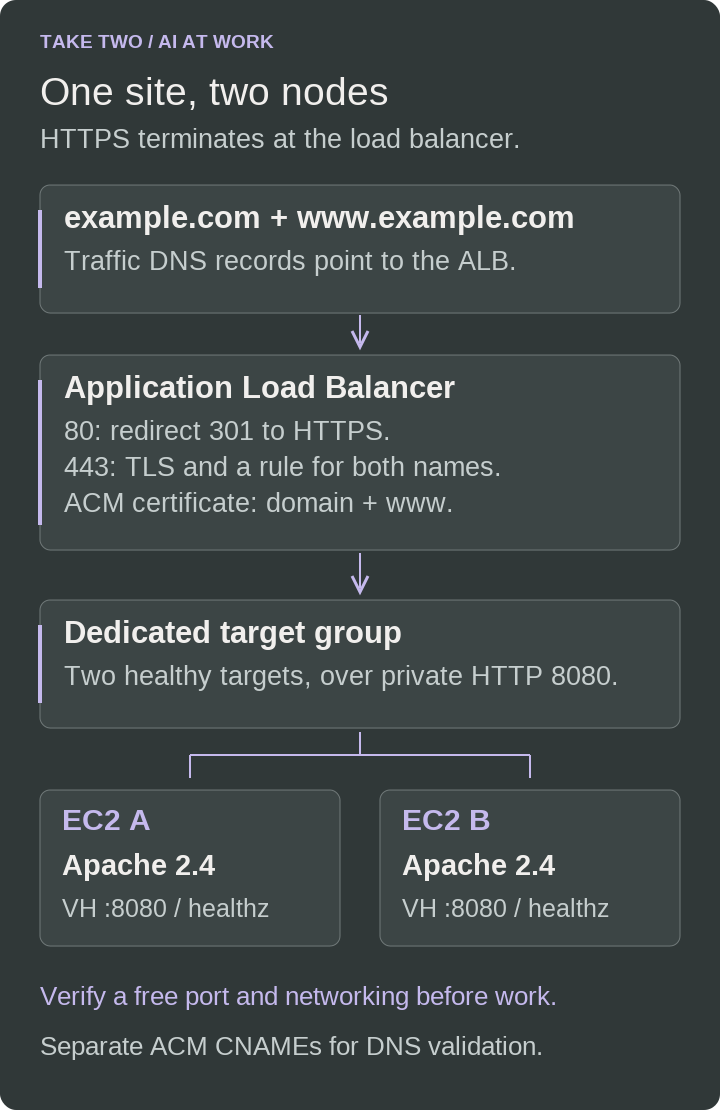
The result is simple to describe but involves configuration, networking, DNS and certificates. Divide it into checkable steps.
<brief project="new-aws-vhost">
  <objective>
    Serve example.com and www.example.com on two existing EC2 instances,
    through an existing ALB, with HTTPS and HTTP-to-HTTPS redirects.
  </objective>
  <facts_to_confirm>
    AWS account and region; both EC2 IDs; VPC and security groups;
    ALB and listener ARNs; DNS zone and authority over it;
    operating system, Apache, SSM access and site artifact.
    Confirm whether resources and configurations are managed through IaC.
  </facts_to_confirm>
  <case_choices>
    TLS on ALB; ACM certificate for both names;
    dedicated target group using port 8080 if available;
    both names remain valid, without a canonical redirect between them.
  </case_choices>
  <boundaries>
    Preserve existing sites, listeners, certificates and rules.
    Agree the change window, budget and authorisations with the owner.
    Keep credentials in the access system, never in prompts or shared logs.
  </boundaries>
  <success>
    Two verified healthy backends; valid HTTPS for both names;
    correct redirects; expected content; agreed existing sites regression-tested;
    final report and recovery procedure available.
  </success>
</brief>
Save the brief, inventory, decisions and verification criteria in the project. Real IDs belong in authorised working materials; the article uses placeholders.
Prepare assignments and allocate boundaries
The coordinator maintains the plan, state and decisions. One agent inventories the environment, one prepares Apache, and one manages ACM, ALB and DNS. A verifier examines evidence and runs tests. Dependencies remain explicit: traffic DNS is updated after the certificate, listeners and backends are ready.
These roles can also be performed sequentially by one agent, with human review. More agents are useful when the environment supports delegation and the work really divides. To build the assignments, start with the method in the article on clear prompts.
<assignment role="coordinator">
  <input>The project brief and inventory when available.</input>
  <objective>Prepare and conduct a verifiable change through to delivery.</objective>
  <method>
    Turn the brief into self-contained assignments for audit,
    Apache, ACM-ALB-DNS and verification. Specify sources, outputs and dependencies.
    Ask for decisive missing facts; do not invent resources or permissions.
    Verify delegation is available before claiming it has happened.
    Give shared resources and files a single owner.
    Prepare diffs, tests, recovery and handover to authorised execution.
    If IaC exists, work through its repository and state.
  </method>
  <progress>
    Maintain job state, phase, heartbeat and evidence references.
    Do not claim completion before the verifier's report.
  </progress>
  <output>Plan, assignments, dependencies, open decisions and completion criteria.</output>
</assignment>
First phase: inspect the environment and prepare the plan
Start in read-only mode: AWS identity, region, instances, listeners, certificates, rules, target groups and current DNS. On the nodes, inspect the OS, ports and VirtualHosts. Run apachectl -S and syntax checks on both machines too: two existing EC2 instances are not necessarily identical.
If Terraform or CloudFormation manages these resources, put the change into its source. Creating a second manual manager for the same listener would make the next update unpredictable. Operational access uses authorised roles and temporary sessions; joining Business does not create them.
<assignment role="read-only-audit">
  <input>Brief and authorised access to the AWS account and both EC2 instances.</input>
  <method>
    Confirm identity, account, region, resource IDs and IaC management.
    Inventory ALB, listeners, priorities, certificates, target groups,
    security groups, DNS and Apache configurations on both nodes.
    Check that 8080 is free and approved content is available.
    Record configurations and baseline evidence for sites to preserve.
    Identify differences between nodes and missing permissions.
  </method>
  <boundary>No changes to infrastructure, DNS or configuration.</boundary>
  <output>
    Minimised inventory, snapshots, commands and outcomes,
    proposed plan, impact, costs to check and recovery procedure.
    Mark assumptions preventing a reliable plan as blockers.
  </output>
</assignment>
Apache: the same verified VirtualHost on both nodes
For the example, prepare a configuration like this. Place and enable the file as required by the distribution. Define Listen 8080 only once; inspect the full loaded configuration first.
Listen 8080

<VirtualHost *:8080>
    ServerName example.com
    ServerAlias www.example.com
    DocumentRoot /srv/www/example/public

    <Directory /srv/www/example/public>
        Options -Indexes
        AllowOverride None
        Require all granted
    </Directory>

    ErrorLog logs/example-error.log
    CustomLog logs/example-access.log combined
</VirtualHost>
Log paths are illustrative and must be adapted to the distribution. The static test site includes /healthz, returning 200 and recognisable content without authentication or redirects. For a real application, choose a check representing the required availability.
An important detail: ALB health checks use the target’s private IP as Host, with a port when applicable, rather than our domain. Testing only with Host: example.com does not prove the target will become healthy. Health checks and Host.
In our plan, the new VirtualHost is the only one on its dedicated port and therefore also handles that port’s default requests. If this assumption is false, design an appropriate health check response. Apache VirtualHost selection.
<assignment role="apache-two-nodes">
  <input>Approved inventory, site artifact and recovery plan.</input>
  <method>
    Prepare a diff compatible with the detected distribution.
    Configure the VH and dedicated port without duplicating Listen.
    Use the same artifact on both nodes and record its hash.
    After authorisation, proceed one node at a time:
    backup, change, syntax check, controlled reload and local tests.
    Test /healthz with both the domain and a Host equivalent
    to the ALB check, and check agreed existing sites.
    On an error, stop the batch and apply the planned recovery.
  </method>
  <output>
    Diff, hashes, per-node outcomes, evidence and recovery files.
    Do not change AWS listeners, DNS or certificates.
  </output>
</assignment>
The backend port is reachable from the ALB security group under approved rules, without exposing it to the Internet. Also check the local firewall, load balancer egress and network controls. ALB security groups.
Certificate, load balancer and DNS: one owner
Request a public ACM certificate for example.com and www.example.com, with DNS validation, in the ALB’s region. A wildcard for *.example.com alone does not cover the bare domain. Check the requested names, ISSUED status and the certificate actually associated. HTTPS certificates.
Validation produces CNAME records to publish exactly as supplied by ACM, removing only identical duplicates. These records do not route web traffic: they establish control of the names. Retain them for managed renewal. ACM DNS validation, DNS renewal.
The dedicated target group registers both instances on the chosen port with /healthz checks. Add a rule on listener 443 forwarding both hosts to that group. If the listener exists, add the certificate to its SNI list without replacing the default or removing previous certificates. If an HTTPS listener is absent, the plan includes creating it with an approved TLS policy and default action. Rule priorities must be free and consistent with existing rules.
On listener 80, a rule restricted to both hosts issues a 301 redirect to HTTPS, preserving the hostname, path and query. Preserve the default behaviour of a shared load balancer. The redirect action can be represented as below; the host condition belongs to its containing rule. ALB actions and redirects.
{
  "Type": "redirect",
  "RedirectConfig": {
    "Protocol": "HTTPS",
    "Port": "443",
    "Host": "#{host}",
    "Path": "/#{path}",
    "Query": "#{query}",
    "StatusCode": "HTTP_301"
  }
}
This avoids asking Apache to force HTTPS based only on the backend connection, which is HTTP in our case. Configure the application to recognise the trusted proxy and external scheme correctly if it uses them. Headers forwarded by ALB.
Finally, publish traffic records. In Route 53, use aliases to the ALB for both names; do not put an ordinary CNAME at the apex. Add AAAA only if the ALB and IPv6 path are actually configured and verified, checking previous records too. DNS routing to ELB.
<assignment role="acm-alb-dns">
  <input>Brief, inventory, approved plan and evidence from both backends.</input>
  <method>
    Work in the existing IaC manager if present, preserving its state.
    Prepare an ACM certificate in the ALB region for both names,
    validation records, target group and host-specific rules.
    Check ISSUED, two healthy targets, security groups and listeners.
    Preserve SNI certificates, default actions and other sites' rules.
    Configure HTTP-to-HTTPS redirects preserving host, path and query.
    After pre-DNS tests, update only authorised records.
    Record every resource ID created or changed and its inverse operation.
    Distinguish DNS waiting from failure; do not poll without a limit.
  </method>
  <output>
    Plan or diff, ACM state, rules, target health, DNS records,
    evidence, costs to confirm and rollback instructions.
  </output>
</assignment>
Verification must also check what might have broken
Before changing DNS, reach the ALB while preserving the correct host and SNI with curl --connect-to. Replace the demonstration load balancer DNS name in the command with the observed one. Do not use -k: we want to verify the certificate too. curl documentation.
curl --fail --show-error \
  --connect-to example.com:443:ACTUAL_ALB_DNS:443 \
  https://example.com/

curl --fail --show-error \
  --connect-to www.example.com:443:ACTUAL_ALB_DNS:443 \
  https://www.example.com/

curl --silent --show-error --dump-header - --output /dev/null \
  --connect-to example.com:80:ACTUAL_ALB_DNS:80 \
  'http://example.com/percorso?prova=1'
Repeat the redirect check for www. Compare Location with the expected URL, path and query; a 301 code alone is insufficient. After the DNS change, repeat checks without --connect-to, verifying public resolution and every published IP family.
Two public responses do not prove that both backends are correct: the load balancer might have selected only one. Combine per-node local evidence, artifact hashes, both targets’ health and external checks. For SSM commands, inspect every invocation and its output; an accepted command ID does not establish successful execution. Run Command statuses.
<assignment role="verifier">
  <input>Brief, inventory, applied changes and evidence references.</input>
  <method>
    Verify both nodes: syntax, configuration, artifact,
    content, health checks and agreed regression checks.
    Check two healthy targets, a valid certificate for both names,
    HTTPS and expected content on the domain and www, before and after DNS.
    Check both HTTP redirects preserve path and query.
    Check IPv6 when published and existing sites in the plan.
    Cite command, time, resource and outcome for every check.
    Treat unavailable evidence as missing; do not infer it from a narrative.
  </method>
  <output>
    report.json with checks and references, overall outcome,
    open issues and whether work is complete or recovery is needed.
    Do not make further infrastructure changes.
  </output>
</assignment>
Configure a task that keeps us informed
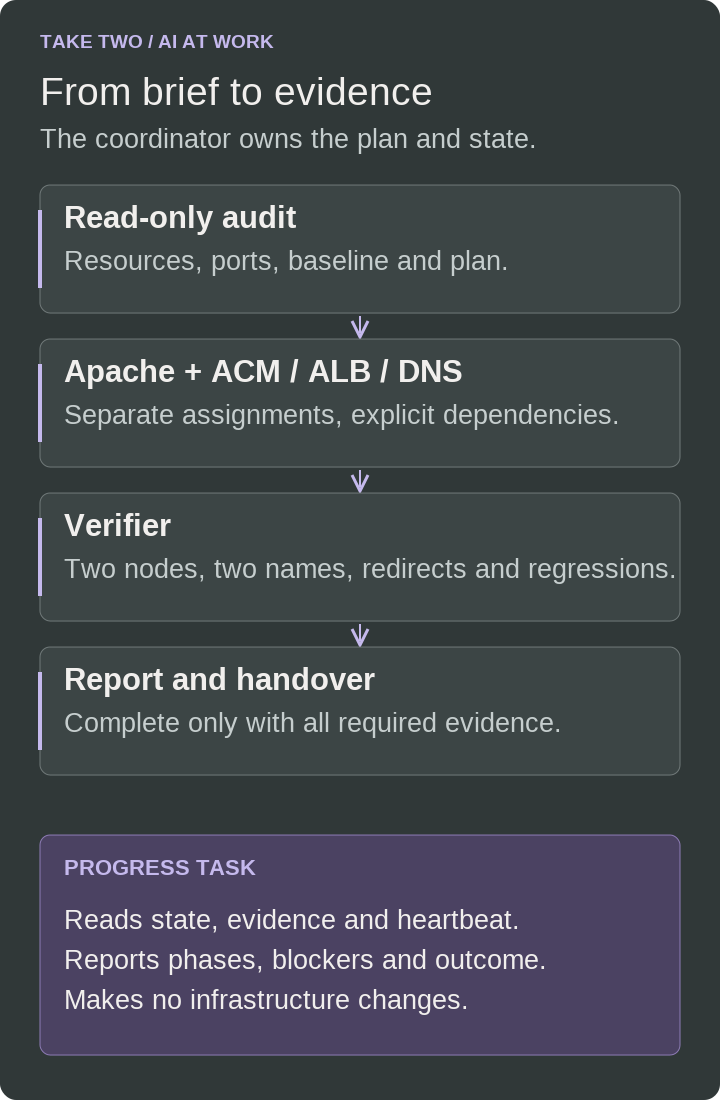
“Tell me when you’re finished” is not enough. We need a running process, a state source and a working notification channel. For this one job, use a finite task reading a JSON file updated by the coordinator. The verifier produces a separate report; the task makes no AWS infrastructure changes.
The article kit includes watch_run.py, an executable example of this check. It reads only state and report, writes its own checkpoint and prints updates. With an already authorised SNS topic configured, it can also publish notifications through AWS CLI; verify the recipient’s subscription before the assignment. SNS publication.
Here is sample state while waiting for the certificate. Dates and IDs are illustrative: the executor must write actual values and update the file through atomic replacement.
{
  "run_id": "vh-example-001",
  "status": "RUNNING",
  "phase": "certificate",
  "updated_at": "2026-11-25T09:05:00Z",
  "heartbeat_at": "2026-11-25T09:06:00Z",
  "summary": "Backends verified; certificate awaiting DNS validation.",
  "report_path": "report.json"
}
<assignment role="job-progress">
  <source>JSON state and verifier report for the assigned run_id only.</source>
  <rules>
    Run checks through an actually started process or runner.
    Send initial status, phase changes and an update every five minutes.
    Report FAILED, BLOCKED or unreadable data immediately when observed.
    If heartbeat is missing for ten minutes, flag unreliable state.
    Apply a sixty-minute overall deadline, to adapt to the plan.
    SUCCEEDED requires a report for the same run_id with all required checks.
    Record successful notifications and report failed ones.
    End this job's monitoring on completion or timeout.
  </rules>
  <output>Status, phase, latest evidence, any blocker and next step.</output>
  <boundaries>No changes to EC2, ALB, ACM or DNS; no secrets in notifications.</boundaries>
</assignment>
For a local test, run the command below in the job folder. The state file must exist with current timestamps; update the first example. The process remains active until completion, failure, blockage or deadline.
python3 watch_run.py --state state.json --run-id vh-example-001 \
  --poll-seconds 30 --progress-seconds 300 \
  --stale-seconds 600 --deadline-seconds 3600
For notifications, add --sns-topic-arn AUTHORISED_TOPIC_ARN --region ACTUAL_REGION, using the already configured AWS session. Test a start notification and a synthetic error. Locally, closing the terminal or shutting down the computer can interrupt the task: for continuity, run it on a team runner with supervision and a runner-failure alert.
Thirty seconds, five, ten and sixty minutes are demonstration settings. Legitimate ACM or DNS waiting may need a different plan; a recent heartbeat distinguishes a live process from a stalled phase. Reaching the deadline means “needs checking,” not “the site is definitely down.”
If the team already uses Step Functions Standard, integrate state events through EventBridge and add periodic reconciliation. Events are an operational signal; application completion depends on the planned tests. There is no need to add this architecture solely to monitor a JSON file. Step Functions events.
Finish the job and keep what we learned
The task reports completion when the report establishes the required results. Handover includes configurations, resource IDs, tests for both names, per-EC2 outcomes, ACM renewal status and recovery instructions. Certificate validation DNS stays published and the certificate remains in use to support managed renewal.
<assignment type="handover-and-checkpoint">
  <content>
    Objective, final configuration, affected resources and their manager;
    passed and missing evidence; files and versions; decisions and reasons;
    certificate renewal, operational owner and rollback;
    observed AI usage, time spent and cloud costs to check.
  </content>
  <output>
    A short handover with references to complete artifacts.
    A self-contained resumption prompt for any open work.
    Instructions reusable for the next site.
    Do not include keys, access tokens or private certificate material.
  </output>
</assignment>
Download the nine XML prompts and the progress task kit. The kit includes the script, instructions, sample state and sample report; it creates no AWS resources or subscriptions.
The exercise gives us a verified site and a method we can repeat. We have learned to choose tools, formulate assignments, read evidence and keep track of work. The next invitation to a new tool will feel less daunting: we will know which small deliverable to start with.
Official documentation checked on 25 November 2026. Architecture choices, timings, prompts and demonstration data are proposals to adapt. None of the described AWS operations was performed while preparing this article.