We need to send an email. We write a list of points, open a chat or an AI agent, and ask it to turn them into a longer, more detailed and professional message.
Out comes an introduction, a few connecting sentences and a conclusion. We read it through and send it.
The recipient sees how long the message is and asks their own AI to summarise it. The result is a list very much like the one we started with.
Does that make sense?
If the intermediate steps add no useful information, we have used two rounds of processing to end up almost where we began. We could use the assistant before sending to make that list clear and complete.
Two AIs and a round trip through words
In this scenario, we are effectively having two AIs communicate through email. The first expands the message; the second removes what we have just added.
We spend computing resources and time generating, checking and summarising a text without necessarily improving communication.
Nor is a return to the original list guaranteed. An important condition might disappear from the summary. A proposal might look like a settled decision. A tentative date might become a firm deadline.
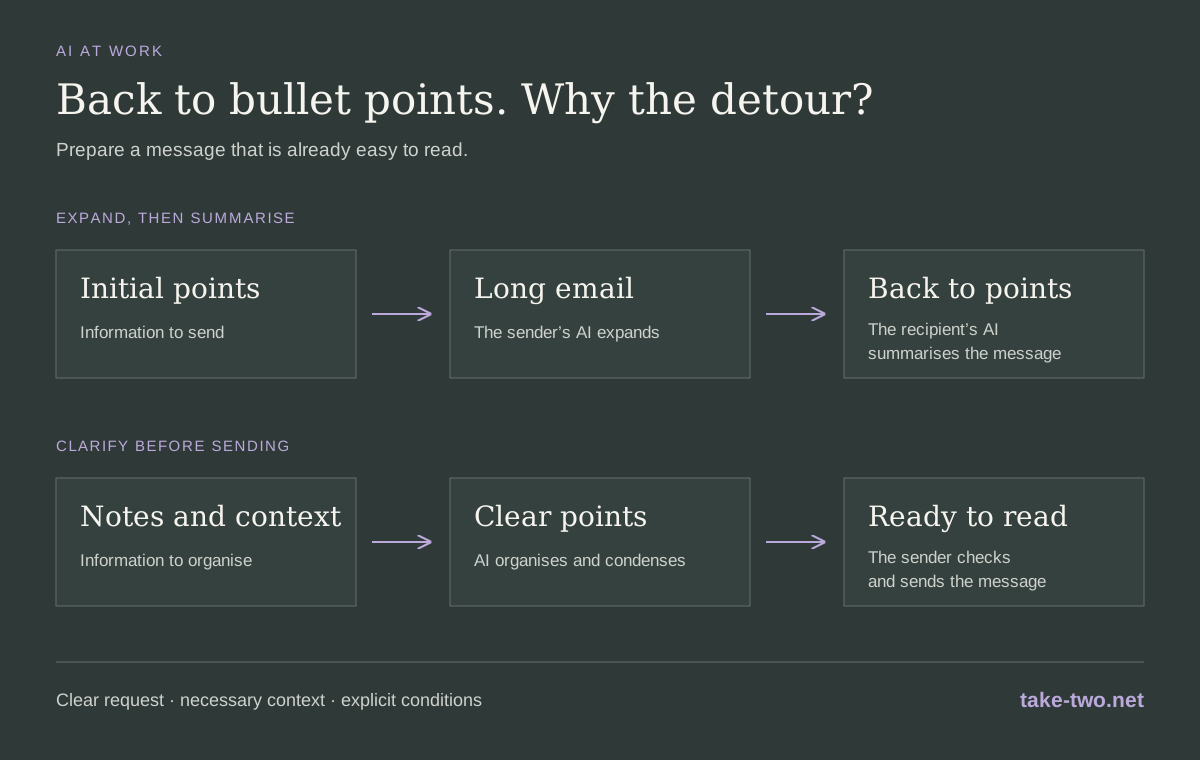
Use AI to organise the information before sending it.
Write better bullet points
A short list can still be unhelpful. “Website update” forces the reader to ask for an explanation. “The website is ready in the test environment; we are still waiting for the homepage copy” already conveys a status and a task to complete.
We can ask the assistant to identify the main request, order the information and check for missing essentials. The recipient should be able to understand what has happened, what response we need and which deadlines or conditions matter.
Give the assistant a lengthy account if necessary. Describe the situation in our own words, including any uncertainties. The work of summarising can happen before the message reaches someone else’s inbox.
An XML prompt to try
We can use the task structure again: objective, context, method, constraints and expected output. The names and dates in this example are illustrative.
<task role="email-review">
  <objective>
    Turn the context into a clear, concise and courteous email.
    Help the reader understand the request and respond.
  </objective>
  <recipient>Laura, marketing manager.</recipient>
  <context>
    The website is ready in the test environment.
    Laura needs to send us the final homepage copy by 12 November.
    The launch is planned for 18 November, but we can only confirm
    it if the copy arrives by 12 November.
    I would like to propose a joint review on 13 November at 10 am.
    This appointment has not yet been confirmed.
  </context>
  <request>
    Ask Laura to confirm delivery of the copy by 12 November
    and her availability for the proposed review.
  </request>
  <method>
    Open with the purpose of the message.
    Organise the information into a few points, one topic per point.
    Distinguish facts, proposals and conditions.
    Preserve necessary dates, responsibilities and reasons.
    Remove repetition and generic wording.
  </method>
  <constraints>
    Do not invent facts, commitments or deadlines.
    Do not turn proposals into confirmed decisions.
    If essential information is missing, ask me for it
    before preparing the draft.
  </constraints>
  <output>
    An informative subject line and the email body:
    a brief opening, specific bullet points and a courteous closing.
  </output>
  <finish>Deliver the draft for my review without sending it.</finish>
</task>
The tags help us separate the parts of the request. We should still read the draft before sending: the summary needs to preserve the meaning of what we wanted to communicate.
The message we can send
One possible result:
Subject: Website launch on 18 November — copy and review confirmation
Hi Laura, To confirm the website launch on 18 November, could you get back to me on the copy and proposed review?
- Status: the website is ready in the test environment.
- Copy: can you confirm delivery of the final homepage copy by 12 November? Confirming the launch depends on meeting this deadline.
- Review: are you available on 13 November at 10 am to check the site together?
Thank you!
The reader can find the current status, the condition for the launch and the two responses needed. The tone remains courteous without adding paragraphs that repeat the same information.
Make room for details when they matter
Some emails need a fuller explanation: a sensitive decision, a complex problem or a proposal for someone unfamiliar with the context. In those cases, we can open with a summary and provide the necessary details below.
For routine work emails, try assessing the message from the recipient’s perspective. Can they understand the request? Do they have enough information to respond? Are the conditions explicit?
If we already know they will look for the key points, let’s write those points well and send them.