I know you’ll ask AI to summarize this. Here’s the short version:
- Updating a library can mean changing thousands of files and components. AI can help inventory references, propose transformations and apply them in batches.
- Start with an XML prompt describing the project. Use chat to turn it into an operational assignment for Codex, with boundaries, dependencies and verifiable results.
- Assign CSS, JavaScript and templates to separate agents, coordinating shared files. A dedicated agent prepares and runs the tests.
- Build a test environment and a baseline before making changes. Record the current behavior of important user journeys so the updated application can be compared against it.
- Review changes by transformation rule and component. The team examines manageable diffs, execution evidence and visual regressions, and keeps responsibility for the release decision.
The longer version starts with a task many teams put off: updating the stack of an application that keeps growing.
A concrete migration for an application built over many years
We have a working web application. Different people have developed it over time, and it now contains hundreds of thousands of lines of code. There’s jQuery, Bootstrap, a few plugins, custom CSS and components added when they were needed. The backend might be Laravel, with Blade templates. Another project might use Angular and a different structure.
Eventually, a dependency needs updating. Changing the package takes minutes. Updating everything built on top of it takes much longer.
Consider the move from Bootstrap 4 to Bootstrap 5. Some classes have new names, some structures need reworking and JavaScript calls need adapting. A modal may open correctly while losing the behavior used to load data or return focus to the original button.
This is a concrete use for vibe coding: describe the outcome, have agents work on the repository and check their changes through repeatable tests. Here, the term means work guided through natural language, with code review. The case is an operational example using Laravel and Blade; prompt paths and components must be adapted to the project.
Choose Bootstrap 5.3 as the target series and pin the exact patch in the plan and lockfile before changing the application. Updating Laravel, Angular, the build system and Bootstrap together would widen the problem considerably. Start with a migration whose scope is clear.
Prepare the first XML prompt
The first task is to describe what we know. The assignment needs to bring together the objective, starting point and success criteria. XML makes these parts easy to identify and reuse.
Tags organize instructions. File permissions, environment isolation and pipeline checks also need to be configured in the tools used for the work.
<brief project="bootstrap-migration">
  <context>
    A web application developed over many years, with extensive
    dependencies on the existing frontend. Reference scenario: Laravel,
    Blade templates, custom CSS or Sass and JavaScript using jQuery.
    Confirm the stack and versions by inspecting the repository.
  </context>
  <objective>
    Migrate Bootstrap 4 to the 5.3 series, pinning the exact patch,
    while preserving agreed application flows and visual identity.
  </objective>
  <scope>
    Bootstrap dependency, required integrations, CSS, JavaScript,
    templates and affected tests. Other upgrades belong in separate tasks.
  </scope>
  <constraints>
    Use dedicated branches and an isolated test environment.
    Use synthetic data and simulated external services.
    Preserve authorization, validation and application logic.
    Exclude vendor code, installed dependencies and compiled assets
    from direct edits; regenerate assets from their sources.
  </constraints>
  <success>
    Reproducible build, agreed journey tests passing,
    old references classified and team review completed.
  </success>
  <information_to_discover>
    Versions, bundler, plugins, directories, commands, existing tests,
    supported browsers and components with custom behavior.
  </information_to_discover>
</brief>
Information we don’t yet know remains something to discover. Mentioning Laravel gives the example a setting; inspection must establish where templates, scripts and configuration actually live.
Use chat to build the Codex assignment
Paste the brief into chat and add the following prompt. Chat designs the assignment. Codex will then have access to the code and can check the assumptions against the repository.
<assignment role="work-designer">
  <input>The XML brief attached in the same message.</input>
  <objective>
    Generate an operational XML prompt for Codex
    to organize and implement the migration.
  </objective>
  <method>
    Separate supplied facts, assumptions and information to verify.
    Include an initial audit and a transformation map.
    Prepare the test environment and baseline before recoding.
    Divide work among coordinator, CSS agent, JavaScript agent,
    template agent and test agent. Define dependencies and shared files.
    Include a pilot batch, human review and completion criteria.
  </method>
  <output>
    A self-contained main prompt incorporating the brief,
    followed by XML assignments for the individual roles.
    For each task specify inputs, assignable files, deliverables, checks
    and conditions requiring a coordinator decision.
    Leave undocumented paths, commands and versions to be discovered.
  </output>
</assignment>
Chat returns a first plan. The team reads it, removes unrelated upgrades and specifies which journeys must keep working. In a business application, these might include signing in, finding a customer, opening an order, changing its lines and saving it.
The main prompt could take this form. Complete it with information verified during the audit.
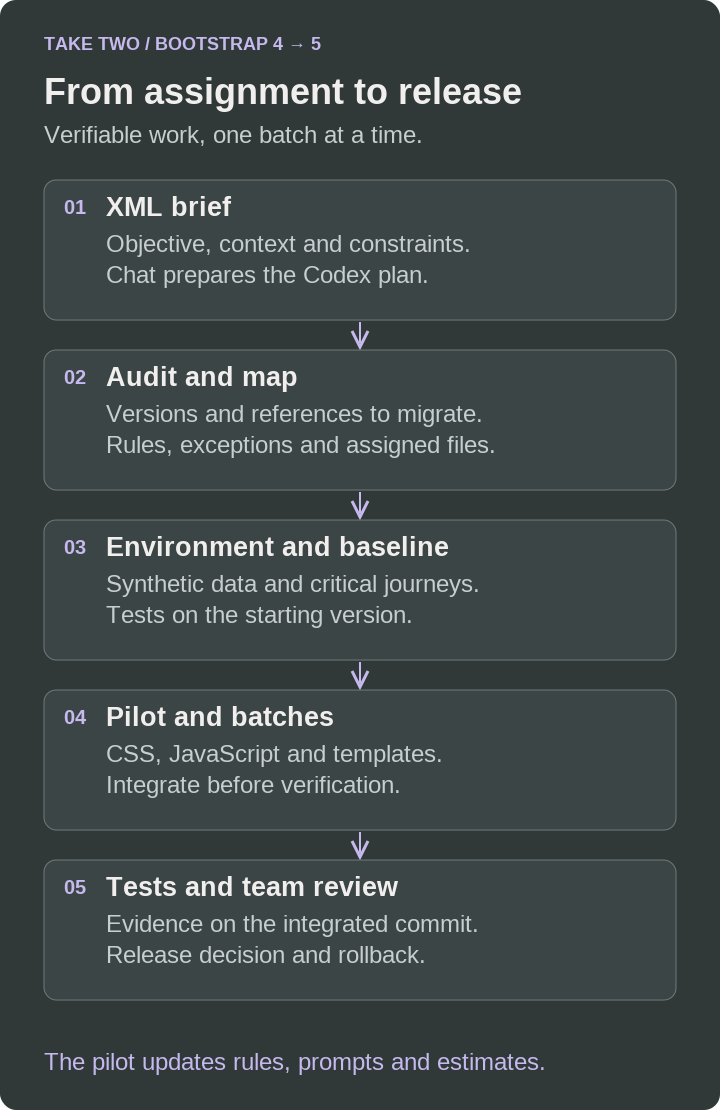
<migration role="coordinator">
  <objective>
    Move the application from Bootstrap 4 to the Bootstrap 5.3 patch
    recorded in the plan, preserving agreed application flows.
  </objective>
  <phase order="1" name="audit">
    Read repository instructions. Identify versions, dependencies,
    build, templates and tests. Produce inventory, map and concerns.
  </phase>
  <phase order="2" name="baseline">
    Assign the test agent an isolated environment, synthetic data
    and repeatable checks of critical journeys on the current version.
    Record pre-existing defects as well.
  </phase>
  <phase order="3" name="pilot">
    Choose a flow involving CSS, templates and JavaScript.
    Pin versions and define the component contract. Integrate and verify
    the batch before extending its rules to the rest of the application.
  </phase>
  <phase order="4" name="batches">
    Assign files and starting commits to the CSS, JavaScript
    and template agents. Integrate deliverables according to dependencies.
    Keep ownership of manifests, lockfiles and shared configuration.
  </phase>
  <phase order="5" name="verification">
    Have the test agent run the suite on the integrated commit.
    Give the team diffs, evidence, exceptions and a rollback procedure.
    Release requires team review and approval.
  </phase>
  <rules>
    One owner per file in each batch. Preserve existing work.
    Use separate checkouts or worktrees for concurrent tasks.
    Check conflicts and shared state before integrating.
    Report incompatible dependencies or cases without a clear equivalent.
  </rules>
  <deliverables>
    Plan with exact versions, inventory, map, assignments,
    commits by batch, test reports and outstanding decisions.
  </deliverables>
</migration>
Assignments can go to separate Codex sessions or to subagents when the environment provides them. The XML structure describes the work; starting sessions and assigning repositories are part of the operational setup.
Start code review before changing the code
Begin with the inventory. Read manifests and lockfiles, look for assets loaded from CDNs, plugins expecting Bootstrap 4, styles overriding components and scripts constructing HTML. In Laravel, also check Blade components, shared layouts and the dependencies of the build actually in use.
An initial search could look like this, with directories adapted to the repository:
rg -n --glob '!vendor/**' --glob '!node_modules/**' \
  --glob '!public/build/**' --glob '!public/js/**' --glob '!public/css/**' \
  'data-(toggle|target|dismiss)|\b(ml|mr|pl|pr)-|\bsr-only\b|\.modal\(' \
  resources app
This is a starting search. Confirm compiled asset paths; classes assembled by concatenating strings require additional searches and checks on rendered pages. Templates stored in JavaScript strings belong in the inventory too.
<assignment role="migration-audit">
  <objective>Inventory every point of contact with Bootstrap 4.</objective>
  <sources>
    Repository, manifests, lockfiles, remote assets and official
    documentation for the starting and target versions.
  </sources>
  <method>
    Search classes, attributes, JavaScript APIs, Sass, shared components,
    HTML strings, dynamic classes and third-party plugins.
    Distinguish sources, dependencies and compiled output.
    For each transformation identify occurrences and their context.
    Classify as mechanical, structural, behavioral or requiring a decision.
  </method>
  <output>
    Inventory with files and lines, component, dependencies, proposed rule,
    official source, risk, responsible agent and planned check.
    Separate list of areas not yet explored.
  </output>
  <boundary>At this stage produce analysis without modifying the application.</boundary>
</assignment>
The transformation map becomes the shared reference. The official migration guide documents changes such as these:
| Previous reference | Version 5 change | Project check |
|---|---|---|
ml-*, mr-*, pl-*, pr-* |
ms-*, me-*, ps-*, pe-* |
Direction, breakpoints and custom styles |
sr-only |
visually-hidden |
Content available to assistive technology |
data-toggle, data-target, data-dismiss |
Bootstrap data-bs-* attributes |
Attribute ownership and related JS selectors |
close |
btn-close and updated markup |
Accessible label and close button |
form-group, form-row |
Rework using spacing and grid | Alignment, messages and validation errors |
card-deck |
Grid or other suitable layout utilities | Column count and responsive behavior |
The first row lends itself to repeatable transformations. The last rows need a layout decision. Codex should distinguish the cases, propose a rule and show where it intends to apply it.
For thousands of references, have Codex prepare a small transformation program, often called a codemod. Run it in preview mode first, read the diff and try the rule on one batch. The program handles class tokens in recognized contexts; ambiguous constructions go into a list for examination.
<assignment role="mechanical-transformation">
  <input>Approved map, assigned source files and the batch rule.</input>
  <example>
    Within recognized Bootstrap class tokens, ml-3 becomes ms-3
    and ml-md-3 becomes ms-md-3. Similar application classes
    require classification before replacement.
  </example>
  <method>
    Prepare a codemod limited to supported contexts.
    Handle templates and strings according to their syntax.
    Produce a preview with diffs, counts and exclusions.
    Check ordinary, responsive, already migrated and preserved cases.
    Apply the rule to the batch after team verification.
    A second run must leave the result unchanged.
  </method>
  <output>
    Program, reproducible command, diff and untransformed cases.
    Structural rewrites remain in dedicated tasks.
  </output>
</assignment>
Prepare the test environment and record current behavior
If the project has few tests, this is the time to build useful initial coverage. Ask Codex to prepare the environment, document startup and automate the main journeys.
Our example needs a runnable Laravel application, a dedicated database with synthetic data, compiled assets and test accounts for the roles being checked. Route email, payments and external integrations to simulators or test services. If the repository already uses containers or a pipeline, start there.
<assignment role="test" phase="preparation">
  <objective>
    Make startup and checks of the current application reproducible
    before the migration.
  </objective>
  <method>
    Identify and reuse existing tools.
    Prepare test configuration, database and synthetic accounts.
    Isolate external integrations and verify service destinations.
    Document installation, build, startup, data reset and suite execution.
    Automate the critical journeys agreed with the team.
    Capture screenshots with controlled viewport, data, browser and fonts.
  </method>
  <baseline>
    Record commit, versions, commands and results for the current version.
    Separate existing defects and checks that cannot be run.
    A failing baseline requires classification before comparison.
  </baseline>
  <output>
    Reproducible environment, tests, test data and baseline report.
    List of covered journeys and those still excluded.
  </output>
</assignment>
A browser test can open a customer record, edit a field in the modal, save and verify the value after reloading. A screenshot also shows whether the dialog runs off screen or covers the confirmation button. The checks serve different purposes, and both are useful.
Pin the baseline to a specific commit. After each integration, compare the same data and steps against the new commit.
Divide CSS JavaScript and templates among agents
Prepare three implementation assignments and a test assignment. The coordinator maintains the plan, manages dependencies and shared files, integrates commits and gives the test agent a complete version to check.
A Blade file may contain HTML, an inline script and a few styles. Give it one owner for that batch. Other agents deliver requested changes as guidance or patches for that owner to integrate. Dividing work by language must account for how files are actually organized.
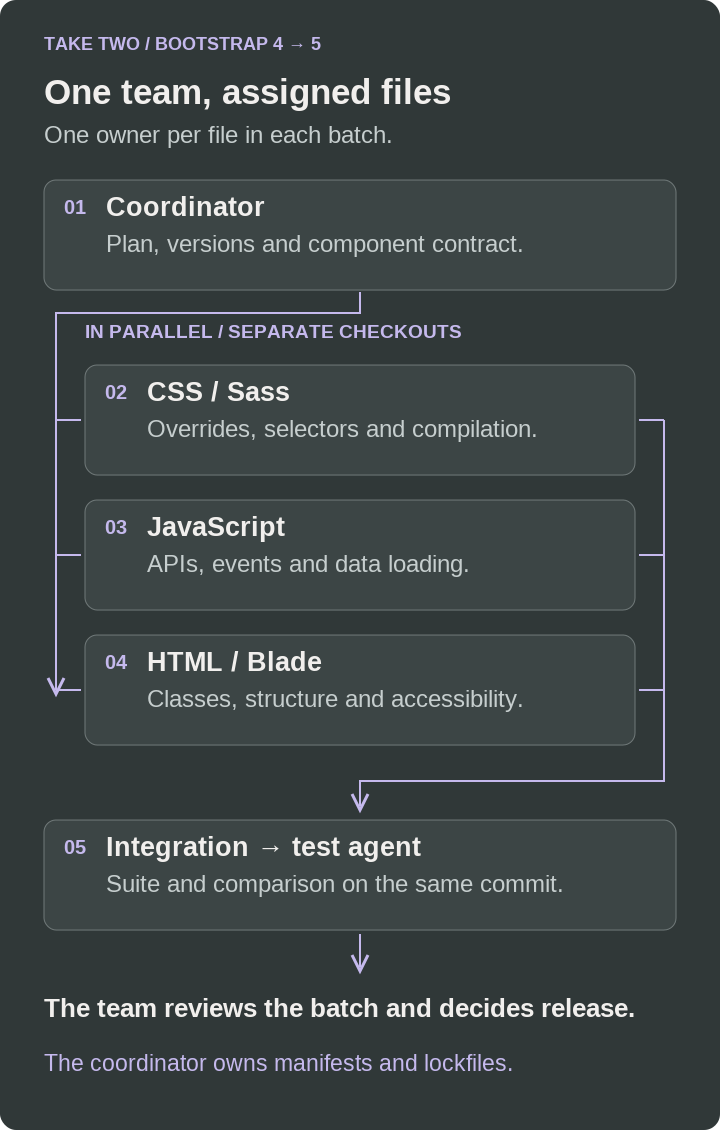
Each assignment below receives the verified plan, transformation map, batch identifier and explicit list of assigned files. Paths follow an example Laravel structure and must be confirmed during the audit.
The CSS agent updates styles and customizations
<assignment role="css">
  <input>Plan, map, baseline, starting commit and assigned files.</input>
  <scope>Only CSS and Sass sources assigned to the batch.</scope>
  <method>
    Review selectors, variables, mixins, imports and customizations
    depending on Bootstrap. Check Sass build compatibility.
    Apply approved rules while preserving visual identity.
    Coordinate renamed classes with template and JavaScript agents.
    Report required changes outside your scope to the coordinator.
  </method>
  <verification>
    Compile assets using the documented command.
    List pages and viewports to compare after integration.
  </verification>
  <output>Scoped commit, applied rules and explained exceptions.</output>
</assignment>
Class names become a coordination point: renaming a class in a template while leaving its custom CSS selector untouched can remove part of the styling. The map therefore includes every reference belonging to the same component.
The JavaScript agent updates integrations and events
Bootstrap 5 removed the mandatory jQuery dependency, but the application and its plugins may still need it. The documentation also describes optional jQuery integration. Removing jQuery from the project therefore requires its own inventory.
<assignment role="javascript">
  <input>Plan, map, baseline, starting commit and assigned files.</input>
  <scope>Only JavaScript sources assigned to the batch.</scope>
  <method>
    Update Bootstrap integrations to the agreed APIs.
    Check imports, initialization, options, events and selectors.
    Preserve data loading, validation and error handling.
    Handle dynamically created components and repeated openings.
    Inventory remaining jQuery usage and incompatible plugins.
    Coordinate inline scripts with the template owner.
  </method>
  <verification>
    Run available lint and tests. Document browser checks needed
    on the integrated component and any blocked cases.
  </verification>
  <output>Commit, remaining dependencies and verified behaviors.</output>
</assignment>
The template agent updates HTML Blade and shared components
<assignment role="template">
  <input>Plan, map, baseline, starting commit and assigned files.</input>
  <scope>Only templates and components assigned to the batch.</scope>
  <method>
    Update classes and attributes owned by Bootstrap.
    Rework component structures without a direct equivalent.
    Preserve Blade directives, escaping, authorization, CSRF tokens,
    field names and error display.
    Check labels, IDs and accessible references.
    Coordinate script-generated markup and shared selectors.
  </method>
  <verification>
    Run the project's template checks.
    List routes, roles and states to check on actual rendered pages.
  </verification>
  <output>Commit, updated components and references awaiting decisions.</output>
</assignment>
Migrate a complete modal as the pilot batch
Choose the customer editing dialog. It is small enough to review while involving all three areas. The component contract defines IDs, fields, events and expected behavior. Agents work from that shared reference.
An older fragment might contain:
<button type="button" data-toggle="modal" data-target="#clienteModal">
Edit customer
</button>
<button type="button" class="close" data-dismiss="modal" aria-label="Close">
<span aria-hidden="true">×</span>
</button>
The updated minimal component becomes:
<button type="button" data-bs-toggle="modal" data-bs-target="#clienteModal">
  Edit customer
</button>
<div class="modal fade" id="clienteModal" tabindex="-1"
     aria-labelledby="clienteModalTitolo" aria-hidden="true">
  <div class="modal-dialog">
    <div class="modal-content">
      <div class="modal-header">
        <h2 class="modal-title fs-5" id="clienteModalTitolo">Edit customer</h2>
        <button type="button" class="btn-close"
                data-bs-dismiss="modal" aria-label="Close"></button>
      </div>
      <div class="modal-body">
        <label for="clienteNome" class="form-label">Name</label>
        <input id="clienteNome" name="nome" class="form-control">
      </div>
    </div>
  </div>
</div>
This fragment demonstrates opening and closing. The application's component still needs its form, data, validation and saving connected. The official modal documentation covers structure, options and events.
If the old code opened the dialog with $('#clienteModal').modal('show'), move to the agreed JavaScript API. This example uses an ES module bundle:
import { Modal } from 'bootstrap';

const elemento = document.getElementById('clienteModal');
if (elemento) {
  // Register this listener only once per element.
  elemento.addEventListener('shown.bs.modal', () => {
    elemento.querySelector('#clienteNome')?.focus();
  });

}

// Import this function into the application's data-loading handler.
export function apriCliente() {
  if (elemento) Modal.getOrCreateInstance(elemento).show();
}
The button uses attributes to open the dialog; programmatic opening uses the API. In production, connect the flow required by the component, avoiding duplicate handlers. Frontends that replace parts of the DOM also need their mounting and cleanup lifecycle checked.
<task component="customer-modal" batch="pilot">
  <input>Component contract, assigned files and journey baseline.</input>
  <contract>
    Preserve IDs clienteModal, clienteModalTitolo and clienteNome.
    The template owns structure and attributes. JavaScript owns loading,
    programmatic opening and events. CSS owns overrides.
    Also specify closing options and unsaved-data handling.
  </contract>
  <acceptance>
    Opening through the trigger and the required programmatic flow.
    Correct customer loading, initial focus and keyboard navigation.
    Closing by button, Escape and backdrop according to agreed options.
    Validation, server errors, saving and persisted-value verification.
    Focus restored to the trigger in the intended flow, and reopening
    without duplicate listeners, leftover backdrops or scroll locks.
  </acceptance>
  <delivery>
    An integrable batch with diffs by area and evidence of behavior.
    Tests await transition completion events when necessary.
  </delivery>
</task>
The pilot also helps improve the prompts. If focus, a dependency or a Blade convention was overlooked, update the contract before extending the work to another fifty modals.
Run tests on the integrated code
Individual agents include checks with their deliverables. The test agent then runs the suite on the commit containing CSS, JavaScript and templates together. That combination is what the team will release.
<assignment role="test" phase="batch-verification">
  <input>
    Integrated commit, baseline, synthetic data, updated map
    and batch acceptance criteria.
  </input>
  <method>
    Verify environment and versions. Build from sources.
    Run application and browser tests on agreed journeys.
    Check console, network, roles, errors, keyboard and planned viewports.
    Compare stable screenshots against the baseline and classify differences.
    Repeat searches for old references, including dynamic classes.
  </method>
  <rules>
    Keep assertions consistent with requirements.
    New visual baselines require review of the differences.
    Report defects to implementers without editing their files.
    Distinguish passed, failed, blocked and not run.
  </rules>
  <output>
    Report with commit, environment, commands, results, screenshots,
    defect reproduction steps and remaining coverage gaps.
  </output>
</assignment>
A successful build tells us assets were produced. The suite helps check the journeys we described. Excluded areas remain visible in the report and affect the release decision.
Organize code review by rule and component
Thousands of occurrences need a structured review. Separate mechanical transformation commits from those changing structure or behavior. For a repeated rule, check the transformation program, a representative sample and exceptions; for modals, menus and forms, review the complete component and its tests.
Each batch shows affected files and occurrence counts: transformed, still open and retained with an explicit reason. Final searches help find leftovers; rendering and tests also cover references generated during execution.
<assignment role="batch-review">
  <input>Integrated diff, map, counts, baseline and test reports.</input>
  <method>
    For each rule compare intent, transformation and exceptions.
    Examine mechanical, structural and behavioral changes separately.
    Check shared selectors, plugins, accessibility and preserved logic.
    Link each acceptance criterion to evidence or an open item.
    Report regressions and scope expansion with files and lines.
  </method>
  <completion>
    Old references classified, reproducible build,
    required tests passing and visual differences reviewed.
    Accepted exceptions have an owner and a reason.
  </completion>
  <output>
    Findings ordered by impact and a summary for the human reviewer.
    Include release instructions, follow-up checks and rollback
    of code and assets. Final approval remains with the team.
  </output>
</assignment>
AI can help the team with this reading too. The human reviewer then assesses the areas they know best: application conventions, user needs and behaviors a test does not yet describe.
Finish the migration with a reusable method
The first batch provides a measure of the work. Record preparation, implementation, review and correction time, then estimate remaining batches by component and complexity. A hundred thousand lines with a few repeated patterns and a hundred thousand lines full of exceptions need different estimates.
With an application runnable in test, repeatable rules and a team available for review, the goal is to complete in a few weeks recoding that could have taken months entirely by hand. Validate the forecast against pilot results and update it when incompatibilities or coverage gaps emerge.
At the end, the stack is updated and the repository also contains a test environment, dependency map, regression suite and reusable XML assignments. The technical rules will change for the next migration. The way of describing, dividing and checking the work will already have a concrete foundation.
The team can spend more time on exceptions and application decisions while agents carry out agreed transformations. This is a use of vibe coding we can evaluate through code, tests and the time needed to finish the work.